FEATURES OVERVIEW

Complete Phone Box Farm Feature Breakdown

Every capability of Phone Box Farm is engineered for professional phone farm operators. Dive deep into each module of the Phone Farm Box software suite and see why thousands trust it for their 20-channel deployments.

MODULE 01

Control Panel — 20-Channel Command Center

The central workspace of Phone Box Farm. Manage up to 20 simultaneous channels with global one-click actions or surgical per-channel adjustments.

  • Total Control row: All USB Mode / All OTG Mode / All Power Off / All Restart — four master buttons that instantly reconfigure every channel
  • Individual Channel grid (5×4): Channels 1 through 20 displayed in a responsive grid, each with its own USB / OTG / OFF button trio
  • Live connection status: Each channel card shows "Connected" or "Disconnected" in real time
  • Color-coded state indicators: Green = USB active, Blue = OTG active, Red = Channel OFF
  • Bulk operations: Select multiple channels or apply templates across device groups
Phone Box Farm - Control Panel
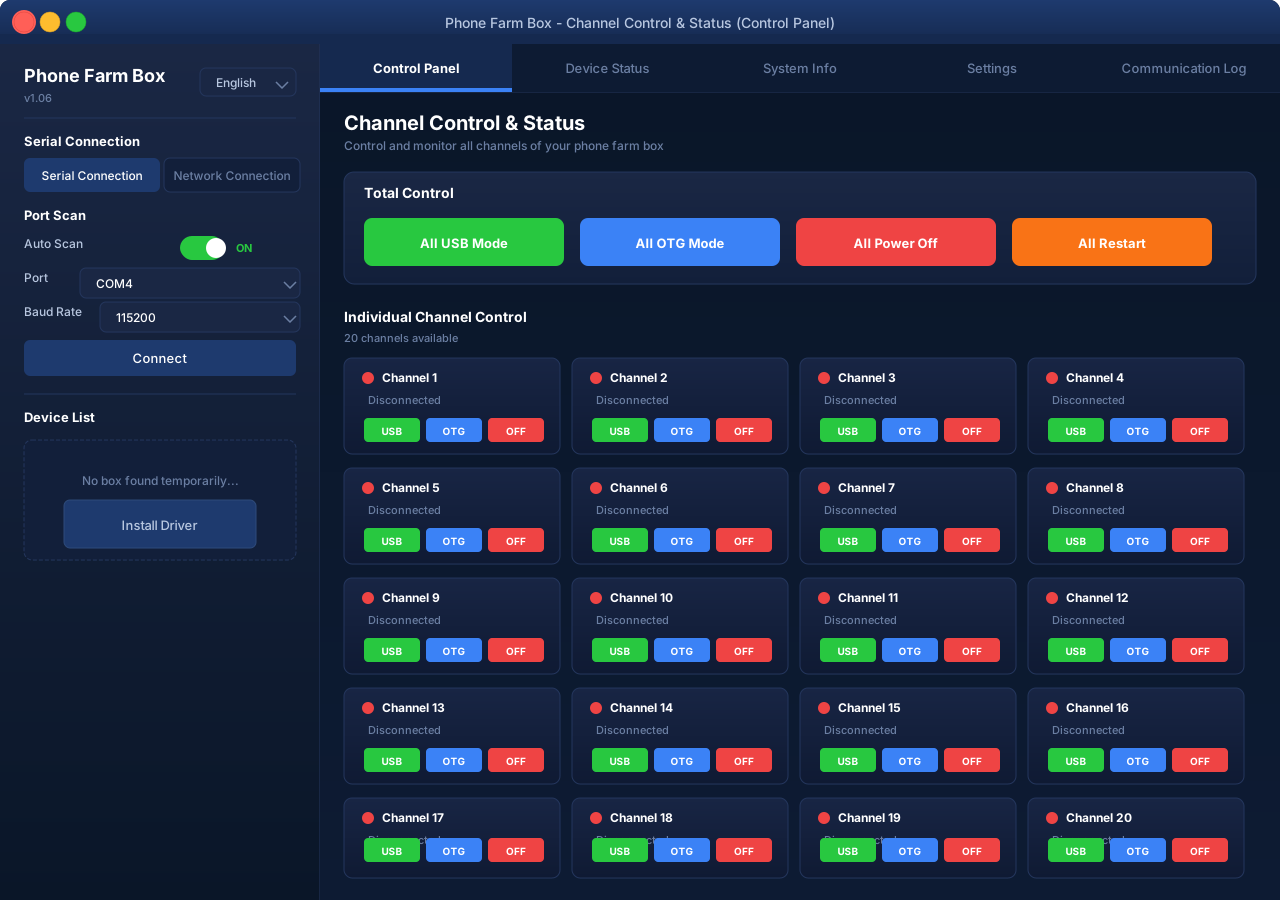
Phone Box Farm Control Panel - 20 channel grid with USB/OTG/Power controls
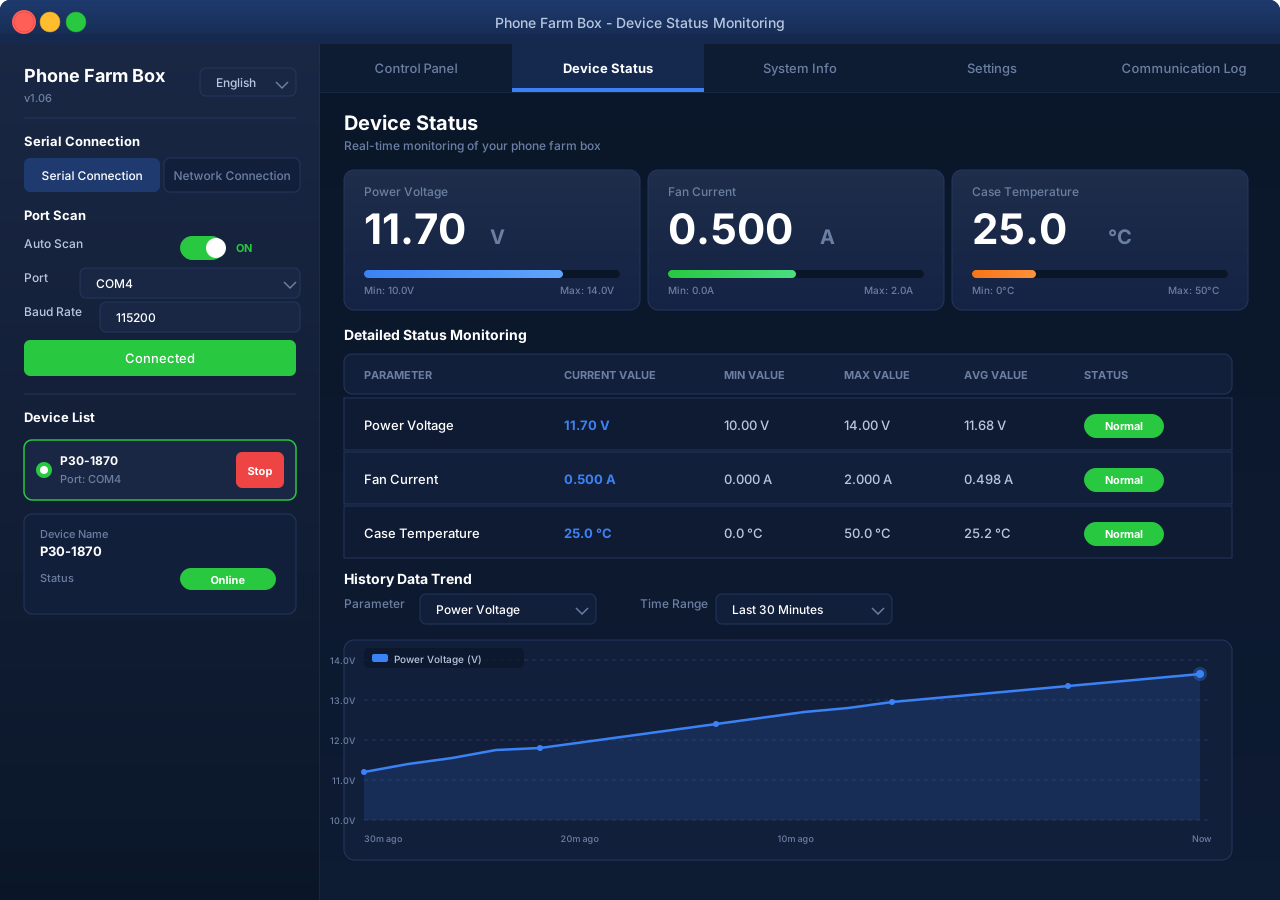
Phone Box Farm - Device Status Monitoring
Phone Box Farm Device Status - Real-time voltage, fan current and temperature monitoring
MODULE 02

Device Status Monitoring — Prevent Failures Before They Happen

Professional phone farms live or die by their thermal and power integrity. The Device Status module gives Phone Box Farm operators complete telemetry visibility.

  • At-a-glance metric cards: Big numerical readouts for Power Voltage (V), Fan Current (A), and Case Temperature (°C)
  • Detailed Status Monitoring table: Six-column grid with Parameter, Current Value, MIN Value, MAX Value, AVG Value, and Status — continuously updated
  • Normal / Warning status badges: Green "Normal" badge during safe operation; automatic color change if thresholds are breached
  • History Data Trend chart: Configurable time window (Last 10 Minutes / Last 30 Minutes / Last 1 Hour / Last 24 Hours) with parameter selector dropdown
  • Auto-refresh on serial connection: Device monitoring and system info reading trigger automatically once a serial port software connection is established
MODULE 03

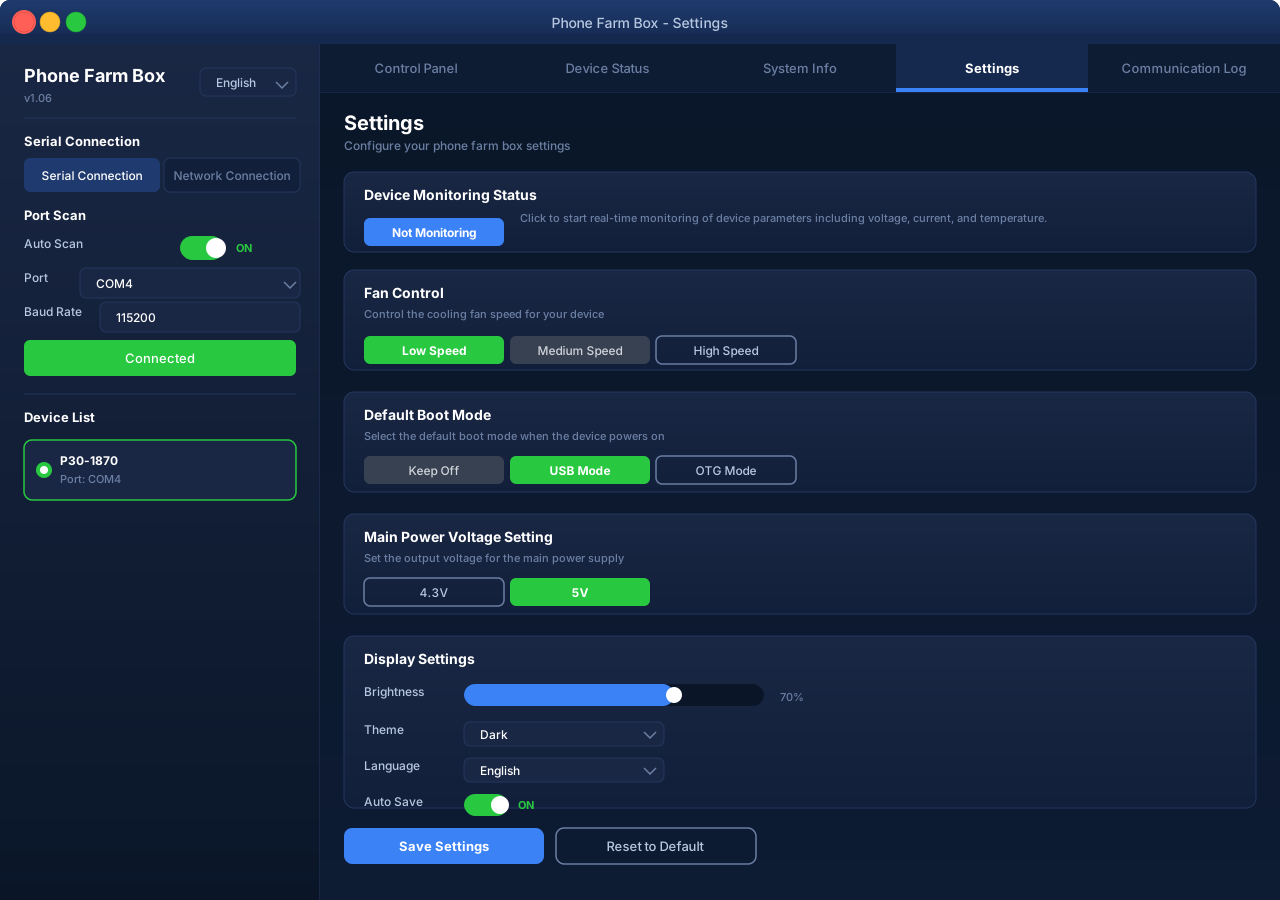
Settings — Fine-Tune Your Phone Farm Hardware

Phone Box Farm gives you granular control over every hardware parameter. Match the software behavior to the exact needs of your A20, P20, P30, or X80 deployment.

  • Fan Control: Three preset fan speeds — Low Speed (quiet operation), Medium Speed (balanced), High Speed (maximum cooling for hot environments) — each with distinct button color states
  • Default Boot Mode: Define the power-on state for every channel — Keep Off (no auto power), USB Mode (default data mode recommended), or OTG Mode (device-to-device mode)
  • Main Power Voltage Setting: Toggle between 4.3V and 5V output depending on your device fleet's specific power requirements
  • Display Settings: Customize brightness level and UI theme (Dark / Light) for long monitoring sessions
  • Device Monitoring toggle: Manual override for monitoring status with contextual description text
Phone Box Farm - Settings Configuration
Phone Box Farm Settings - Fan speed, boot mode and voltage configuration
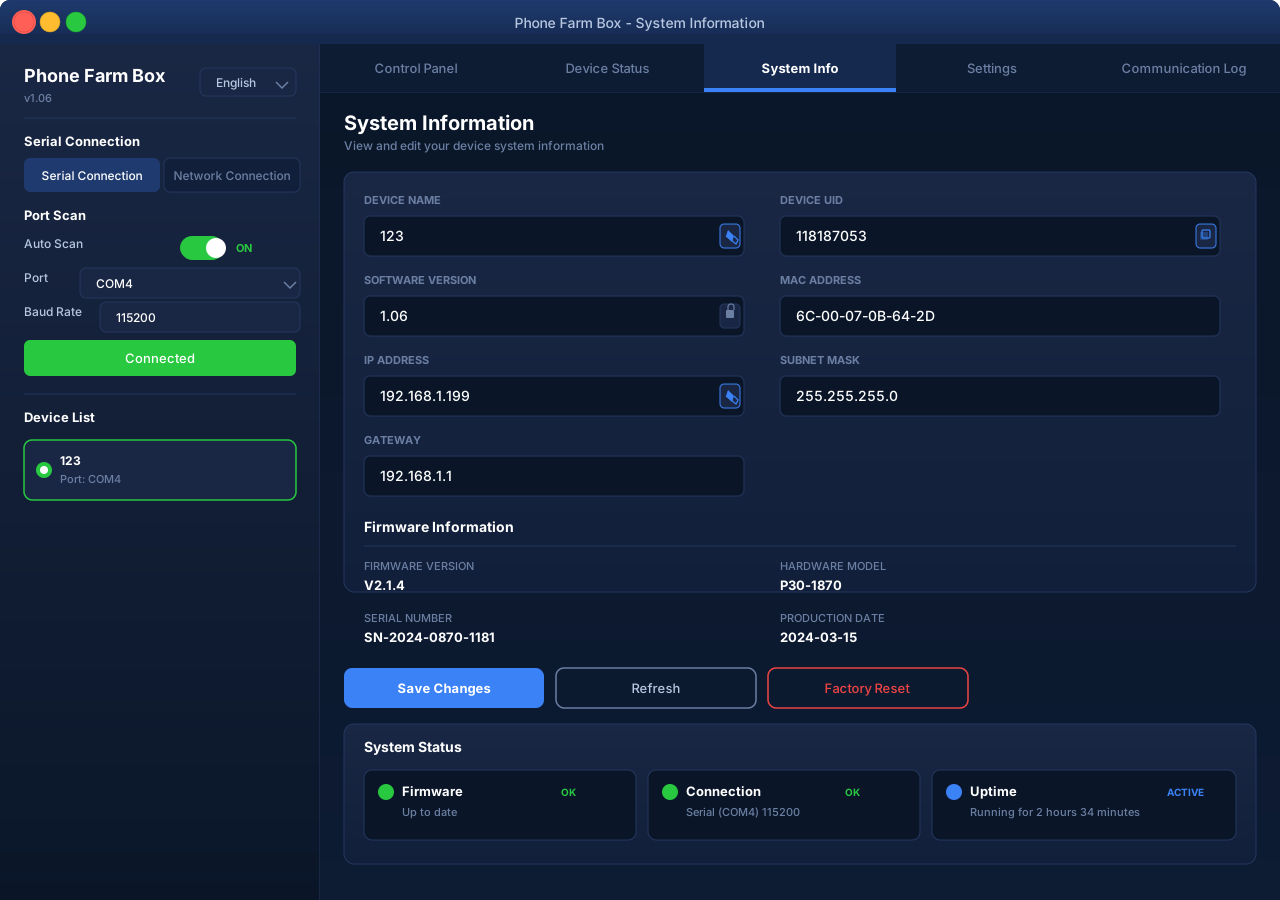
Phone Box Farm - System Information
Phone Box Farm System Info - Device UID, firmware version, IP and MAC address
MODULE 04

System Info — Know Your Phone Box Farm Inside Out

Inventory and configure your hardware fleet from within the Phone Box Farm app itself. The System Info tab eliminates guesswork and simplifies multi-device fleet management.

  • Device identity: Editable Device Name (e.g., "P30-1870") plus immutable Device UID for unambiguous asset tracking
  • Software version reporting: Installed firmware version displayed for quick compatibility checks against Phone Box Farm release notes
  • Networking details: MAC Address (factory assigned), IP Address, Subnet Mask, and Gateway — all displayed with Edit pencil icons for in-app updates
  • Device List panel: Running list of detected Phone Box Farm hardware units with assigned Port (e.g., "COM4") and live connect/disconnect control buttons
  • Driver install helper: One-click button to install the Phone Box Farm driver if no box is detected after the automatic 1-minute scan window
MODULE 05

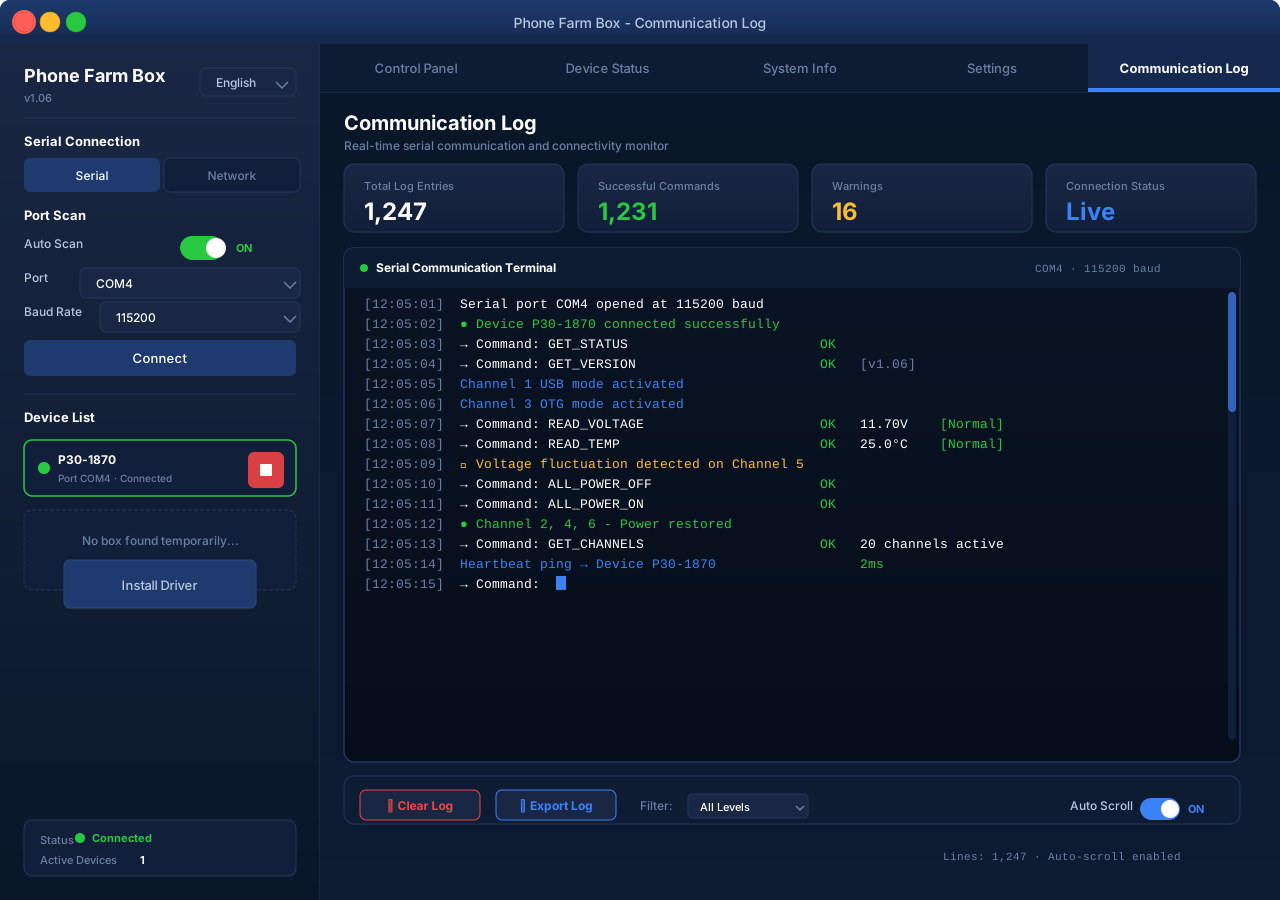
Connectivity — Serial & Network, Auto Scan, Communication Log

Phone Box Farm works how your infrastructure works. Connect via the classic serial port for rock-bottom latency or use network mode for remote installations.

  • Serial Connection tab: Direct COM-port connectivity with Port Scan trigger; works with any USB-to-serial adapter and all A20/P20/P30/X80 control boards
  • Network Connection tab: TCP/IP over Ethernet or Wi-Fi — perfect for rack-mounted phone farms where the control PC is in another room
  • Auto Scan toggle: When enabled, Phone Box Farm automatically scans for hardware on startup. Disable for manual port selection in multi-box setups
  • Driver installation prompt: Smart detection — if no Phone Box Farm hardware is found within 60 seconds, a prominent Install Driver button appears
  • Communication Log: Full timestamped record of every command, response, status change, and error — indispensable for debugging advanced Phone Farm Box configurations
Phone Box Farm - Connectivity Panel
Phone Box Farm Connectivity - Communication log with serial and network connection details
COMPATIBILITY

Officially Supported Phone Farm Devices

Phone Box Farm is extensively tested with the most popular phone farm hardware platforms on the market.

A20

A20 Phone Farm Box

Entry-level 20-channel controller. Perfect for small-to-medium phone farm setups and first-time operators.

  • 20 Channels
  • USB 2.0
  • Serial COM
P20

P20 Phone Farm Box

Mid-range workhorse with enhanced thermal performance. The most popular choice for growing phone farms.

  • 20 Channels
  • USB 3.0 Ready
  • Gigabit LAN
P30

P30 Phone Farm Box

Premium P-Series controller with smart power regulation. Recommended for 24/7 production deployments.

  • 20 Channels
  • Smart Power
  • Enhanced Cooling
X80

X80 Phone Farm Box

Flagship 80-port scalable chassis. Stack multiple X80 units and manage them all from one Phone Box Farm instance.

  • 80 Channels
  • Rack-mount
  • Redundant PSUs
RELEASE NOTES

Phone Box Farm Changelog

  1. v1.0.6Jan 15, 2025Latest
    • Added Network Connection mode (TCP/IP) for remote phone farm management
    • Improved Auto Scan algorithm — 3× faster detection of A20/P20/P30/X80 devices
    • New 24-hour trend view in Device Status history chart
    • Fixed COM-port conflict handling on Windows 11 23H2
  2. v1.0.5Dec 02, 2024
    • X80 multi-unit stack support added
    • Fan control curves tuned for quieter operation
    • Communication Log export to CSV file
  3. v1.0.4Oct 18, 2024
    • Added 5V / 4.3V voltage selector in Settings
    • MAC address and IP fields made directly editable
    • Windows 7 compatibility fixes

Try All Phone Box Farm Features — 100% Free

No signup, no credit card, no trial period. Download the complete Phone Box Farm software today and experience the difference.